Image Processing
2D image processing on DynMatrix<T> buffers: convolution, Gaussian / box / unsharp / Laplacian / morphological filters, Sobel and Scharr gradients, order-statistic filters (median, percentile, rank), integral image, and bilinear resize. Column-major, no-std, no external codecs.
Requires the imageproc Cargo feature (implies alloc):
All operations work on real-float images (f32, f64) via the FloatScalar trait. The fast sliding-histogram median (median_filter_u16) is a u16 specialization for quantized data.
Multi-threading
Add the rayon feature to run most filters (convolution / blur, rank & median, morphology, resize, local statistics) in parallel over output columns — roughly 2.5–4× on large images, with identical results. It is opt-in and cfg-isolated, so the no-rayon build is unchanged. See Parallelism.
Data Layout
Images are DynMatrix<T> buffers with row index = vertical (y) axis and column index = horizontal (x) axis. Storage is column-major, so a single image column is contiguous in memory. Convolution inner loops are implemented as column-wise AXPY accumulations and dispatch automatically to the crate's SIMD kernels (NEON / SSE2 / AVX / AVX-512).
Convert from row-major external data (e.g., a pixel buffer from a PNG decoder) with DynMatrix::from_rows; recover a flat Vec<T> with into_vec().
use numeris::DynMatrix;

// Row-major [f32] from e.g. a decoded image; 2 rows × 3 cols.
let pixels = [0.0_f32, 1.0, 2.0, 3.0, 4.0, 5.0];
let img = DynMatrix::from_rows(2, 3, &pixels);
assert_eq!(img[(0, 2)], 2.0);
assert_eq!(img[(1, 0)], 3.0);

// Consume and get the column-major Vec back.
let flat: Vec<f32> = img.into_vec();
Border Handling
Every filter that reads beyond the image extent takes a BorderMode<T>:
| Mode | Behavior |
|---|---|
Zero |
Out-of-bounds reads return 0 |
Constant(c) |
Out-of-bounds reads return c |
Replicate |
Nearest edge pixel (aaa\|abcd\|ddd) |
Reflect |
Mirror about the boundary without duplicating the edge (cba\|abcd\|dcb) |
Reflect matches OpenCV's BORDER_REFLECT_101. Replicate is the usual choice for natural images.
Convolution
2D convolution in the correlation convention (the kernel is not flipped):
for a \(k_y \times k_x\) kernel with half-sizes \(h_y = \lfloor k_y/2 \rfloor\) and
\(h_x = \lfloor k_x/2 \rfloor\); out-of-bounds reads follow the chosen BorderMode.
A separable kernel \(k = k_y\, k_x^\top\) is applied as two 1D passes in
\(O\!\left(h\,w\,(k_y + k_x)\right)\) instead of \(O(h\,w\,k_y k_x)\).
Kernel generators
use numeris::imageproc::{
    gaussian_kernel_1d, box_kernel_1d,
    sobel_x_3x3, sobel_y_3x3,
    scharr_x_3x3, scharr_y_3x3,
    laplacian_3x3, laplacian_3x3_diag,
};

// Truncated 1D Gaussian, normalized to DC gain 1.
let k = gaussian_kernel_1d::<f64>(1.5, 3.0).unwrap();     // length 2·ceil(3·1.5)+1 = 11

// Uniform (box / moving-average) kernel.
let b = box_kernel_1d::<f64>(5).unwrap();                  // [0.2, 0.2, 0.2, 0.2, 0.2]

// 3×3 operators returning numeris::Matrix<T, 3, 3>.
let sx = sobel_x_3x3::<f64>();
let lap = laplacian_3x3::<f64>();
Dense convolution
use numeris::{DynMatrix, Matrix};
use numeris::imageproc::{convolve2d, BorderMode};

let img = DynMatrix::<f64>::fill(16, 16, 1.0);
let k = Matrix::<f64, 3, 3>::new([
    [1.0, 2.0, 1.0],
    [2.0, 4.0, 2.0],
    [1.0, 2.0, 1.0],
]);
let out = convolve2d(&img, &k, BorderMode::Replicate);
The kernel is applied as correlation (not flipped) — matching OpenCV filter2D and MATLAB imfilter. Sobel/Scharr kernel generators are pre-oriented so that a dark→bright transition produces a positive response.
Separable convolution
When the 2D kernel factors as kernel_y ⊗ kernel_x (as all symmetric blurs do), use two 1D passes. Cost drops from O(H·W·K_y·K_x) to O(H·W·(K_y + K_x)).
use numeris::DynMatrix;
use numeris::imageproc::{convolve2d_separable, gaussian_kernel_1d, BorderMode};

let img = DynMatrix::<f64>::fill(32, 32, 1.0);
let k = gaussian_kernel_1d::<f64>(2.0, 3.0).unwrap();
let blurred = convolve2d_separable(&img, &k, &k, BorderMode::Replicate);
Both passes run as whole-column AXPYs on contiguous source/dest columns, so they dispatch straight into the SIMD kernels on f32/f64.
Reusing the output buffer
convolve2d_separable allocates its output on every call. On a large image (a 2048² f32 frame is 16 MB) the fresh allocation plus first-touch page faults is a sizeable share of the call, so an allocation-free variant exists — bit-for-bit identical to the allocating call, which is a thin wrapper over it:
convolve2d_separable_into(src, ky, kx, border, &mut dst)writes into a caller-owned buffer.dstis resized tosrc's shape if it does not match (reallocating only when capacity is insufficient) and its contents discarded; a pipeline filtering many same-size frames therefore reuses one buffer for all of them.
Internally the convolution is banded: the image is processed in bands of output columns (64 by default, wider for long kernels), and each band's vertical pass runs over the band plus a kernel-half-width halo into a small scratch slab — (band + K_x − 1) · nrows elements, allocated once per call, or once per rayon job under rayon — that the band's horizontal pass then reads. No whole-image intermediate is ever materialized, and the slab stays cache-resident across the horizontal pass, which is a larger win on big images than the saved output allocation itself. The result is identical regardless of band width or thread count: every output column is computed by the same per-column pass reading the same values in the same order.
use numeris::DynMatrix;
use numeris::imageproc::{gaussian_blur_into, BorderMode};

// Reuse the output across frames — no image-sized allocation after the
// first call (only the band scratch slab and the 11-tap kernel).
let frames = (0..3).map(|f| DynMatrix::<f32>::fill(256, 256, f as f32));
let mut dst = DynMatrix::<f32>::zeros(0, 0);
for frame in frames {
    gaussian_blur_into(&frame, 1.5, BorderMode::Replicate, &mut dst);
    // ... consume `dst` ...
}
Blurs and Sharpening
use numeris::DynMatrix;
use numeris::imageproc::{gaussian_blur, box_blur, unsharp_mask, BorderMode};

let img = DynMatrix::<f64>::fill(64, 64, 10.0);

let g = gaussian_blur(&img, 1.5, BorderMode::Replicate);       // σ=1.5, auto separable
let b = box_blur(&img, 2, BorderMode::Replicate);              // 5×5 mean
let sharp = unsharp_mask(&img, 1.0, 0.7, BorderMode::Replicate); // img + 0.7·(img − blur)
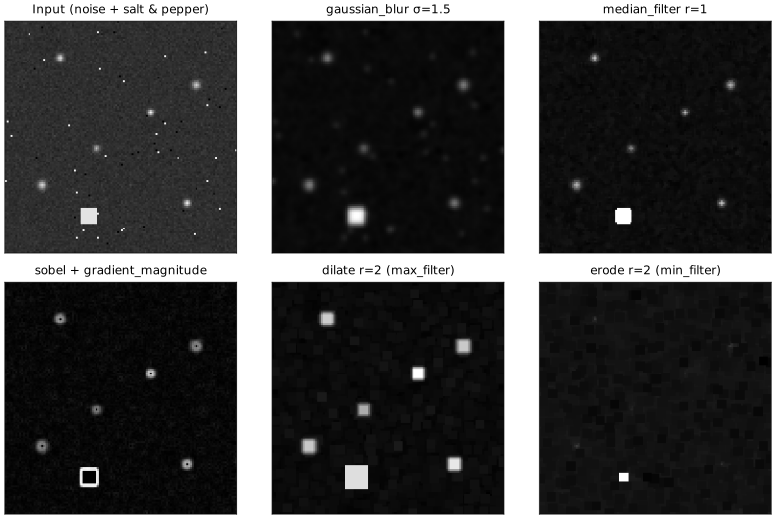
gaussian_blur truncates the kernel at 3σ on each side (gaussian_blur_kernel(sigma) returns exactly that kernel) and delegates to convolve2d_separable. gaussian_blur_into is its allocation-free counterpart — see Reusing the output buffer. unsharp_mask composes a blur with a per-pixel subtract — useful for edge enhancement.
Gradients and Edges
Sobel and Scharr estimate the spatial derivatives \(g_x \approx \partial f/\partial x\) and \(g_y \approx \partial f/\partial y\) by 3×3 convolution; the edge strength is the gradient magnitude \(\lvert\nabla f\rvert = \sqrt{g_x^2 + g_y^2}\), and the Laplacian is \(\nabla^2 f = \partial^2 f/\partial x^2 + \partial^2 f/\partial y^2\).
use numeris::DynMatrix;
use numeris::imageproc::{
    sobel_gradients, scharr_gradients, gradient_magnitude,
    laplacian, laplacian_of_gaussian, BorderMode,
};

let img = DynMatrix::<f64>::fill(32, 32, 50.0);

let (gx, gy) = sobel_gradients(&img, BorderMode::Replicate);
let mag = gradient_magnitude(&gx, &gy);

// Scharr variant — better rotational symmetry than Sobel.
let (sx, sy) = scharr_gradients(&img, BorderMode::Replicate);

// Second-order operators.
let lap = laplacian(&img, BorderMode::Replicate);
let log = laplacian_of_gaussian(&img, 1.0, BorderMode::Replicate);
Order-Statistic Filters
Median, percentile, and rank filters are non-linear and not separable — each output pixel independently takes an order statistic of its window. numeris provides three paths:
Generic quickselect (any FloatScalar)
use numeris::DynMatrix;
use numeris::imageproc::{median_filter, percentile_filter, rank_filter, BorderMode};

let img = DynMatrix::<f64>::fill(32, 32, 5.0);

// 3×3 median — auto-dispatches to a stack-allocated [T; 9] fast path.
let m = median_filter(&img, 1, BorderMode::Replicate);

// 25th percentile in a 5×5 window (useful for background estimation).
let p = percentile_filter(&img, 2, 0.25, BorderMode::Replicate);

// Arbitrary rank: rank=0 is min, rank=K-1 is max.
let r = rank_filter(&img, 1, 0, BorderMode::Replicate);
At radius = 1 and radius = 2, median_filter splits the image into an interior region with inlined contiguous-column gathers and stack-allocated 9- or 25-element window buffers, and a border region that falls back to the generic border-aware gather.
Huang sliding histogram (u16)
For quantized data (8- to 16-bit integer images), use the u16 specialization — O(H·W·r) instead of O(H·W·r²) via a 65 536-bin histogram that is incrementally updated as the window slides:
use numeris::DynMatrix;
use numeris::imageproc::{median_filter_u16, BorderMode};

let mut img = DynMatrix::<u16>::fill(64, 64, 800);
img[(32, 32)] = 4095;  // outlier pixel
let out = median_filter_u16(&img, 3, BorderMode::Replicate);
assert_eq!(out[(32, 32)], 800);
When to quantize
Raw float images can be scaled to u16 when the dynamic range is bounded (typical for calibrated sensor data). 12-bit precision is usually ample for background estimation and denoising. The 256 KB histogram fits comfortably in L2 cache.
Block-median pool (fast, approximate)
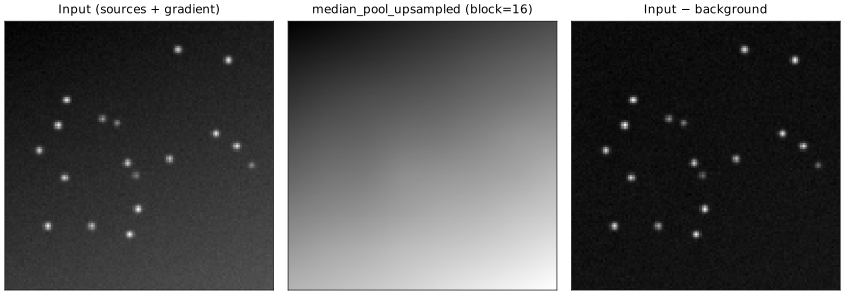
For fast smooth background estimation, median_pool_upsampled computes a block-median decimation and bilinear-upsamples back to the original resolution. Dramatically faster than a true sliding median at large radii, at the cost of losing edge localization:
use numeris::DynMatrix;
use numeris::imageproc::median_pool_upsampled;

let img = DynMatrix::<f64>::fill(512, 512, 10.0);
let bg  = median_pool_upsampled(&img, 16);  // 16×16 block median + bilinear
See the background subtraction example below.
Morphology
Grayscale dilation and erosion via the Van Herk – Gil-Werman sliding-max/min algorithm: O(1) amortized per pixel regardless of radius (~3 comparisons/pixel), as two separable 1D passes.
use numeris::DynMatrix;
use numeris::imageproc::{dilate, erode, max_filter, min_filter, BorderMode};

let img = DynMatrix::<f64>::fill(32, 32, 0.0);

let d = dilate(&img, 3, BorderMode::Zero);   // max over 7×7 window
let e = erode(&img, 3, BorderMode::Zero);    // min over 7×7 window

// Aliases — same implementation:
let max5 = max_filter(&img, 2, BorderMode::Replicate);
let min5 = min_filter(&img, 2, BorderMode::Replicate);
Prebuilt compositions:
use numeris::imageproc::{opening, closing, morphology_gradient, top_hat, black_hat, BorderMode};
# use numeris::DynMatrix;
# let img = DynMatrix::<f64>::fill(16, 16, 1.0);

let op   = opening(&img, 2, BorderMode::Replicate);               // erode → dilate
let cl   = closing(&img, 2, BorderMode::Replicate);               // dilate → erode
let grad = morphology_gradient(&img, 1, BorderMode::Replicate);   // dilate − erode
let th   = top_hat(&img, 3, BorderMode::Replicate);               // src − opening
let bh   = black_hat(&img, 3, BorderMode::Replicate);             // closing − src
top_hat isolates bright features smaller than the structuring element (great for point-source extraction on an uneven background); black_hat does the dual for dark features.
Integral Image
Summed-area table for O(1) rectangle sums — the key primitive for constant-time box features, Haar descriptors, and variance maps:
use numeris::DynMatrix;
use numeris::imageproc::{integral_image, integral_rect_sum};

let img = DynMatrix::from_rows(
    3, 3,
    &[1.0_f64, 2.0, 3.0,
      4.0,     5.0, 6.0,
      7.0,     8.0, 9.0],
);
let sat = integral_image(&img);

// Sum over any half-open rectangle [r0, r1) × [c0, c1) in O(1).
let s = integral_rect_sum(&sat, 0, 0, 3, 3);  // 45.0
let s_centre = integral_rect_sum(&sat, 1, 1, 2, 2);  // 5.0
The summed-area table \(S(i, j) = \sum_{i' < i,\; j' < j} f(i', j')\) is \((H{+}1) \times (W{+}1)\) with a zero-padded first row and column, so the sum over any half-open rectangle \([r_0, r_1) \times [c_0, c_1)\) reduces to a four-term inclusion-exclusion:
Local Statistics
Moving-window mean, variance, and standard deviation — O(1) per pixel via one integral image for \(x\) and another for \(x^2\), using \(\operatorname{Var}(x) = E[x^2] - (E[x])^2\). Boundary windows clip to the image extent (fewer terms near the edges).
use numeris::DynMatrix;
use numeris::imageproc::{local_mean, local_variance, local_stddev};

let img = DynMatrix::<f64>::fill(32, 32, 5.0);
let mean   = local_mean(&img, 3);
let var    = local_variance(&img, 3);  // E[x²] − E[x]², clamped ≥ 0
let stddev = local_stddev(&img, 3);    // sqrt(var)
These power adaptive_threshold, local contrast normalization, and noise-floor estimation.
Multi-Scale
Difference of Gaussians — band-pass blob detector, approximates the Laplacian of Gaussian:
use numeris::imageproc::{difference_of_gaussians, BorderMode};
# use numeris::DynMatrix;
# let img = DynMatrix::<f64>::fill(64, 64, 1.0);
let dog = difference_of_gaussians(&img, 1.0, 1.6, BorderMode::Replicate);
Gaussian pyramid — iterative blur + 2× decimate, useful for multi-scale search:
use numeris::imageproc::{gaussian_pyramid, BorderMode};
# use numeris::DynMatrix;
# let img = DynMatrix::<f64>::fill(128, 128, 1.0);
let levels = gaussian_pyramid(&img, 5, 1.0, BorderMode::Replicate);
// levels[0] is the original (128×128); levels[4] is 8×8.
Thresholding
use numeris::DynMatrix;
use numeris::imageproc::{threshold, threshold_otsu, adaptive_threshold};

let img = DynMatrix::<f64>::fill(32, 32, 0.7);

// Static cutoff.
let bin = threshold(&img, 0.5);

// Otsu's method — automatic threshold via between-class variance
// maximization over a 256-bin histogram. Ties in the run of max-variance
// bins are resolved to the midpoint.
let t = threshold_otsu(&img);

// Adaptive — each pixel compared against its local mean + offset.
// Uses the integral image; O(1) per pixel.
let adapt = adaptive_threshold(&img, 7, 0.02);
Edge Detection (Canny)
Full five-stage pipeline: Gaussian blur → Sobel → gradient magnitude → non-maximum suppression along the quantized gradient direction → double threshold → hysteresis (8-connectivity, DFS from strong seeds).
use numeris::DynMatrix;
use numeris::imageproc::{canny, BorderMode};

let img = DynMatrix::<f64>::fill(64, 64, 0.0);
let edges = canny(&img, 1.4, 0.05, 0.15, BorderMode::Replicate);
// edges is a binary {0, 1} image.
Typical parameters: sigma ≈ 1.0–1.6, high ≈ 3·low.
Corner Detection
Both operate on the Gaussian-smoothed structure tensor of the gradients,
Harris — response \(R = \det(M) - k\,(\operatorname{tr} M)^2\). Positive for corners, negative for edges, \(\approx 0\) for flat regions.
Shi-Tomasi — the smaller eigenvalue \(\min(\lambda_1, \lambda_2)\) of \(M\). More selective than Harris for corners vs. edges.
use numeris::DynMatrix;
use numeris::imageproc::{harris_corners, shi_tomasi_corners, BorderMode};

let img = DynMatrix::<f64>::fill(64, 64, 0.0);
let harris = harris_corners(&img, 1.0, 0.05, BorderMode::Replicate);
let tomasi = shi_tomasi_corners(&img, 1.0, BorderMode::Replicate);
Both return a raw response map — threshold it and run your own peak finder (e.g. a local-maximum pass) to get corner positions.
Connected Components
Connected-components labeling groups foreground pixels into maximal connected regions. Numeris uses two-pass SAUF (Scan + Array-based Union-Find, Wu/Otoo/Suzuki 2009) with union-find path compression and union by rank — O(H·W·α(H·W)).
The foreground definition is elem != background, so any MatrixRef<T> with T: Scalar + PartialEq works — binary u8 images, thresholded floats, labeled masks — all first-class.
use numeris::DynMatrix;
use numeris::imageproc::{connected_components, Connectivity};

let img = DynMatrix::<u8>::from_rows(
    4, 5,
    &[1, 1, 0, 1, 1,
      1, 1, 0, 1, 1,
      0, 0, 0, 0, 0,
      0, 0, 0, 0, 0],
);
let comps = connected_components(&img, Connectivity::Four, 0u8);
assert_eq!(comps.len(), 2);
Each Component reports:
| Field | Type | Meaning |
|---|---|---|
area |
u32 |
Pixel count |
bbox_min, bbox_max |
(u32, u32) |
Inclusive bounding box (row, col) |
centroid |
(f64, f64) |
Mean of pixel coordinates |
mu20, mu02, mu11 |
f64 |
Central second moments, unnormalized |
mu20, mu02, mu11 are Σ(r−r̄)², Σ(c−c̄)², Σ(r−r̄)(c−c̄). Feed [[mu20, mu11], [mu11, mu02]] to a 2×2 symmetric eigendecomposition to get the principal axes / orientation / eccentricity; divide by area for variance / covariance.
If you need the per-pixel coordinates of a component, iterate the inclusive bbox window against one of the labels-image variants below and collect the pixels whose label matches i + 1.
Connectivity choice
use numeris::DynMatrix;
use numeris::imageproc::{connected_components, Connectivity};

// Two pixels touching only diagonally.
let img = DynMatrix::<u8>::from_rows(
    2, 2,
    &[1, 0,
      0, 1],
);
assert_eq!(connected_components(&img, Connectivity::Four,  0u8).len(), 2);
assert_eq!(connected_components(&img, Connectivity::Eight, 0u8).len(), 1);
Labeled-image variants
When a downstream step needs to mask or index by component ID, two variants additionally return a labels image with label 0 at background pixels and label i+1 at pixels belonging to component i:
connected_components_labeledreturns aDynMatrix<u32>(column-major, matching the rest of the imageproc API) — best when the labels image will be passed to other numeris routines.connected_components_with_label_bufferreturns a row-major flatVec<u32>— best when downstream code sweeps each component's bounding box in scan order, since iteration is cache-friendly without a column-major repack.
use numeris::DynMatrix;
use numeris::imageproc::{connected_components_labeled, Connectivity};

let img = DynMatrix::<u8>::from_rows(
    3, 3,
    &[1, 0, 2,
      1, 0, 2,
      0, 0, 0],
);
let (labels, comps) = connected_components_labeled(&img, Connectivity::Four, 0u8);
assert_eq!(comps.len(), 2);
assert_eq!(labels[(0, 0)], 1);
assert_eq!(labels[(0, 2)], 2);
If the labels image isn't needed, prefer connected_components — it skips the H × W × 4 bytes labels allocation.
Geometric Utilities
use numeris::DynMatrix;
use numeris::imageproc::{
    flip_horizontal, flip_vertical, rotate_90, rotate_180, rotate_270,
    pad, crop, resize_nearest, BorderMode,
};

let img = DynMatrix::<f64>::zeros(4, 6);

let fh = flip_horizontal(&img);
let fv = flip_vertical(&img);
let r  = rotate_90(&img);    // 4×6 → 6×4
let r2 = rotate_180(&img);
let r3 = rotate_270(&img);

// Pad by 2 pixels on all sides using the border mode.
let padded = pad(&img, 2, 2, 2, 2, BorderMode::Replicate);

// Crop a subregion [top, left, height, width].
let cropped = crop(&img, 1, 1, 2, 3);

// Nearest-neighbour resize — use for masks / label maps where bilinear
// would corrupt discrete values.
let mask_up = resize_nearest(&img, 8, 12);
Bilinear Resize
Each output pixel maps to a source coordinate \((x, y)\) and blends the four surrounding samples with the fractional offsets \(t_x, t_y \in [0, 1)\):
Pixel-center coordinate convention, matching OpenCV's default INTER_LINEAR:
use numeris::DynMatrix;
use numeris::imageproc::resize_bilinear;

let img = DynMatrix::from_rows(2, 2, &[0.0_f64, 1.0, 2.0, 3.0]);
let up = resize_bilinear(&img, 8, 8);
assert_eq!(up.nrows(), 8);
Per-axis interpolation indices and fractional weights are precomputed; the inner loop runs per output column with direct col_as_slice access to contiguous source columns, so the compiler reliably auto-vectorizes it.
Choosing an Algorithm
| Task | Radius | Best option |
|---|---|---|
| Smoothing (low-noise) | any | gaussian_blur (gaussian_blur_into to reuse an output buffer across frames) |
| Mean filter | any | box_blur (separable) or local_mean (integral, O(1)/px) |
| Salt-and-pepper denoise, float | ≤ 2 | median_filter (stack-array fast path) |
| Salt-and-pepper denoise, float | ≥ 3 | median_filter (quickselect) |
| Salt-and-pepper denoise, ≤16-bit int | any | median_filter_u16 (Huang) |
| Smooth background map | any | median_pool_upsampled |
| Grayscale morphology | any | dilate / erode (Van Herk) |
| Arbitrary percentile | any | percentile_filter |
| Local variance / std | any | local_variance / local_stddev |
| Binary thresholding | — | threshold / threshold_otsu / adaptive_threshold |
| Edge detection | — | sobel_gradients + gradient_magnitude, or canny for thinned binary edges |
| Corner detection | — | harris_corners / shi_tomasi_corners |
| Connected components | — | connected_components (sparse) / connected_components_labeled (column-major labels image) / connected_components_with_label_buffer (row-major labels buffer) |
| Blob detection | — | difference_of_gaussians / laplacian_of_gaussian |
| Bright-spot isolation | — | top_hat |
| Multi-scale search | — | gaussian_pyramid |
| Rectangle sums | — | integral_image + integral_rect_sum |
| Bilinear resize | — | resize_bilinear |
| Nearest-neighbour resize (masks) | — | resize_nearest |
| Flip / rotate 90° / pad / crop | — | flip_* / rotate_* / pad / crop |
Background Subtraction
A pipeline for isolating bright point sources on a spatially-varying background by subtracting a coarse median-pooled estimate:
use numeris::DynMatrix;
use numeris::imageproc::median_pool_upsampled;

fn background_subtract(frame: &DynMatrix<f32>) -> DynMatrix<f32> {
    // Block-median rejects bright sources; bilinear upsample smooths the map.
    let bg = median_pool_upsampled(frame, 16);
    // Subtract into a new buffer.
    DynMatrix::from_fn(frame.nrows(), frame.ncols(), |i, j| {
        frame[(i, j)] - bg[(i, j)]
    })
}
For a 1024×1024 frame with 16×16 blocks: ~4 096 block medians of 256 elements each (≈1 M quickselect ops) + O(H·W) bilinear upsample. Much faster than a true sliding median at the same effective radius.
Sliding vs block median
median_pool_upsampled approximates a sliding median — outputs are blurred by the bilinear upsample and edges are not strictly preserved. If your pipeline needs the exact salt-and-pepper rejection semantics (e.g. isolated dead pixels near a point source), use median_filter_u16 with a small radius and quantize first; if you only need a smooth background subtraction, the pool is far faster.